Submission: Bitbucket
Deadline: End of day.
public class WeatherStation {
    public static void main(String[] args) {
        WeatherData weatherData = new WeatherData();

        CurrentConditionsDisplay currentDisplay = new CurrentConditionsDisplay(weatherData);
        StatisticsDisplay statisticsDisplay = new StatisticsDisplay(weatherData);
        ForecastDisplay forecastDisplay = new ForecastDisplay(weatherData);

        weatherData.setMeasurements(80, 65, 30.4f);
        weatherData.setMeasurements(82, 70, 29.2f);
        weatherData.setMeasurements(78, 90, 29.2f);
    }
}
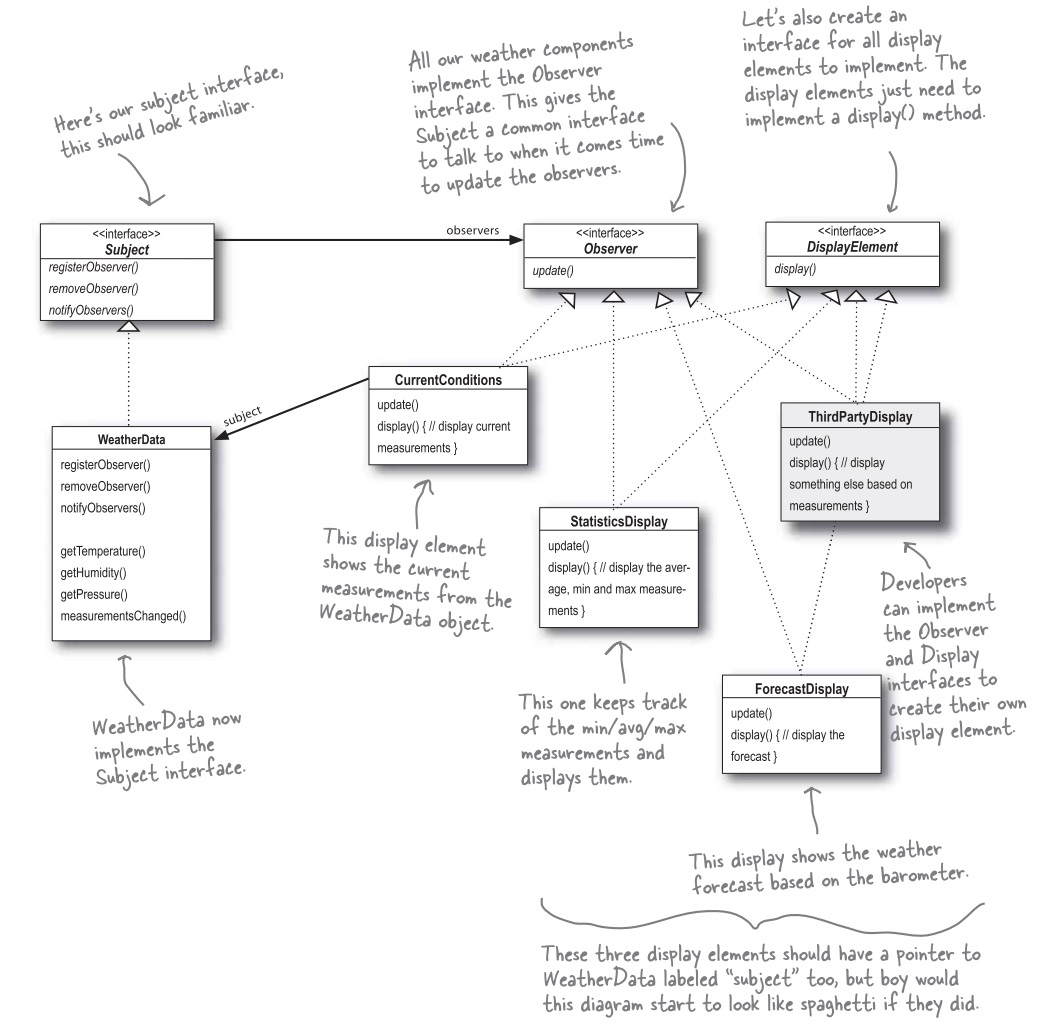
Implement WeatherData and three types of displays so that when you run WeatherStation, it produces the following output:
Current conditions: 80F degrees and 65% humidity
Avg/Max/Min temperature = 80.0/80.0/80.0
Forecast: Improving weather on the way!
Current conditions: 82F degrees and 70% humidity
Avg/Max/Min temperature = 81.0/82.0/80.0
Forecast: More of the same
Current conditions: 78F degrees and 90% humidity
Avg/Max/Min temperature = 80.0/82.0/78.0
Forecast: Watch out for cooler, rainy weather!
Well, weather forecasting is not an exact science. So I wouldn't care what it produces. But you should follow the design below.
public class SwingObserverExample {
    private JFrame frame;

    public static void main(String[] args) {
        SwingObserverExample example = new SwingObserverExample();
        example.go();
    }

    private void go() {
        frame = new JFrame();

        JButton button = new JButton("Should I do it?");
        button.addActionListener(new AngelListener());
        button.addActionListener(new DevilListener());
        frame.getContentPane().add(button, BorderLayout.CENTER);

        frame.setSize(300, 200);
        frame.setVisible(true);
    }

    private class AngelListener implements ActionListener {
        @Override
        public void actionPerformed(ActionEvent e) {
            System.out.println("Don't do it, you might regret it!");
        }
    }

    private class DevilListener implements ActionListener {
        @Override
        public void actionPerformed(ActionEvent e) {
            System.out.println("Come on, do it!");
        }
    }
}